| Patches | |
|---|---|
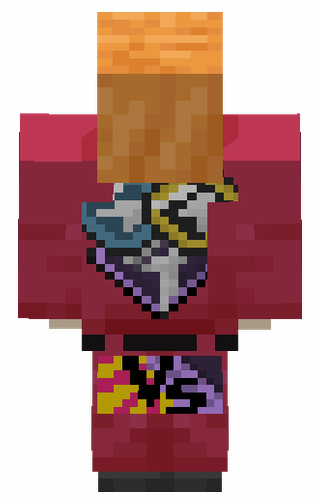 Patches sewn on the back of an ovve | |
| Obtained from | Crafting, structure chests, events |
| Sewn onto | Ovve or frack |
| Stored in | Your patch stash (/ovvar stash) |
| Limit | None per ovve |
Obtaining
Crafted
The chapters’ own patches are a dye in the middle of the crafting grid with a string on each of its four sides:
| Dye | Patch |
|---|---|
| Lime Dye |  ITK |
 Laser Violet Dye |  IT |
 Cerise Dye |  Data |
 RGB Dye |  Medieteknik |
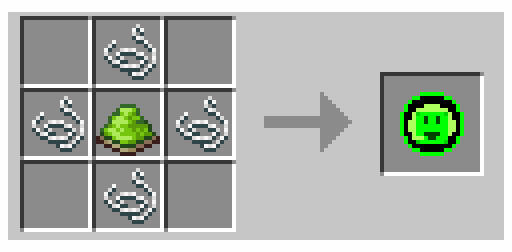
An IT patch crafted with a Bottle o’ Enchanting becomes the IN patch  .
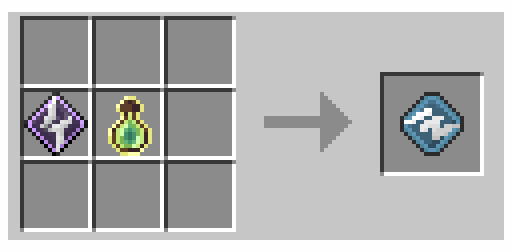
Laser Violet and Cerise are the new dyes.
Found
Every other patch is treasure: a chest in any structure (a village house, a dungeon, a mineshaft, a shipwreck, a temple and the rest) has about a one in twenty chance of holding one. Not the bonus chest at spawn.
Given
The Rivals patch comes only from the Rivals event, and the TMEIT Marshal patch only to TMEIT’s marshals: nobody crafts or finds those two. Everyone who participated in the Metacraft Rivals event has been given its patches.
A patch you are given goes into your stash with a flourish and a line in chat, and waits there until you take it out.
List of patches
| Patch | Name | Artist | Obtained from |
|---|---|---|---|
| ITK | Crafting | |
 | METAcraft Rivals ‘26 (seat) | Rivals event | |
| IT | Cactooz | Crafting |
| Data | Crafting | |
 | Spiken | Cactooz | Chests |
 | Släggan | Cactooz | Chests |
 | Ticket to my heart | Måns | Chests |
 | Maid dress | Mackan | Chests |
 | Pung (seat) | Chests | |
| IN | Ainrave | Crafting |
 | IN (gold) | Ainrave | Chests |
 | Nyckeln 0x0 | Ainrave | Chests |
 | Nyckeln 0x1 | Ainrave | Chests |
 | Nyckeln 0x2 | Ainrave | Chests |
 | KomMN | Ainrave | Chests |
 | JGS | Chests | |
 | TMEIT | Chests | |
 | TMEIT Marshal | TMEIT’s marshals | |
 | Batata | Ainrave | Chests |
 | Batato | Ainrave | Chests |
 | Batatu | Ainrave | Chests |
 | Cerise | Ainrave | Chests |
 | Playboy Pikachu | Ainrave | Chests |
 | Starkt | Ainrave | Chests |
 | Data Neko | Millia | Chests |
 | KTH | Millia | Chests |
 | Media Neko | Millia | Chests |
| Medieteknik | Millia | Crafting |
 | METAcraft | Millia | Chests |
 | METAcrew | Millia | Chests |
Where they go
A patch goes on any cell of the ovve you can see: the chest and back, and the outer, front and back of the sleeves and legs. Not on the collar, the belt, the hands or the cuffs. Bigger patches hang over their cell onto the cloth around it.
Two places are special:
- the big back cell is the whole back below the collar. The biggest patches fit it whole, and smaller ones may be sewn on top of it;
- the seat takes one wide patch across the back of both legs, like the Rivals or Pung patch. Sew the seat or the backs of the legs, not both.
On the Media Frack only the coat takes patches: no legs, no seat.
There is no limit to how many patches an ovve carries.
A patch is either an item in the world, in your stash, or sewn on your ovve, never two of those at once. Unpick it and it comes back to you; sew it and it leaves your hand.
Sewing
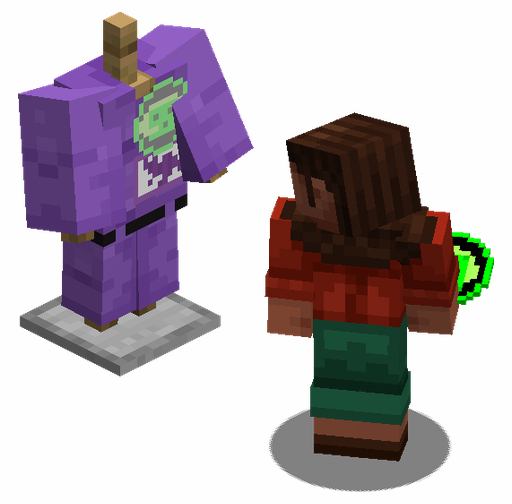
Put your ovve on an armor stand. Hold a patch and look at the stand: the patch shows washed-out where it will go, and the action bar names the spot. Right-click to sew it on.
Sneak to aim at the far side of the part you are looking at: the back of the body, the back of an arm. The aim follows the stand’s pose, so a posed stand works too.
Only the owner of an ovve can sew on it or unpick from it.
The stitching
Where the stitching minigame is on, the right-click opens the sewing instead: the patch lies on the cloth and the seam runs around its edge. The needle sits on the next hole: click it to pull the thread through. The last pull sews the patch on. Escape, or “Cut the thread”, gives up; the patch only leaves your hand when the seam is done.
Unpicking
Shears on a sewn patch take it off the ovve and hand it back to you.
Taking the ovve back
Click the stand’s body or an arm with an empty hand and the whole ovve, patches and all, comes off into your hand. Clicking its legs does the same.
Stash
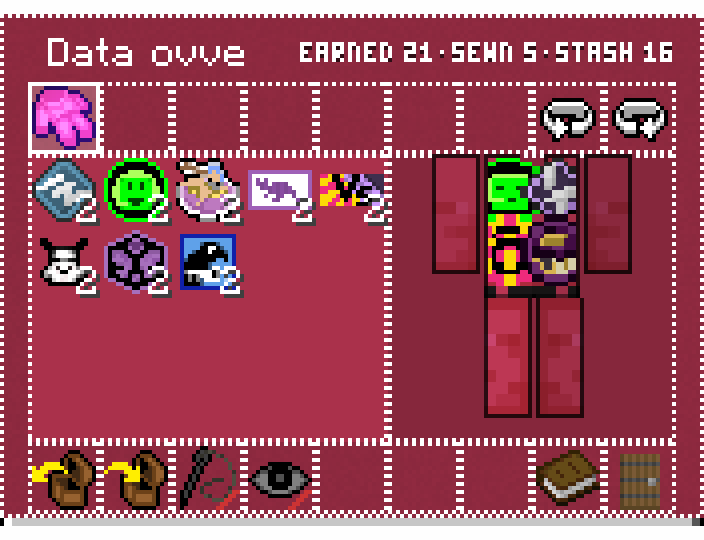
/ovvar stash menuThe patches you own but have not sewn are your stash. It is stored once for all of METAcraft’s servers, so patches earned on an event server show up on the SMP too.
/ovvar stash opens it:
- Top: an ovve per chapter you own.
- Left: your stash.
- Right: your ovve now; the arrows turn it.
- Bottom: what you can do here.
Anything the server does not allow is greyed out, with the reason when you hover it.
- Left-click a patch to take one out as an item: sew it on any stand wearing your ovve, or trade it.
- Put held patches in, the second button on the bottom row, puts every patch item you carry back into the stash.
- See it in 3D stands a mannequin in front of you for a minute, wearing the ovve you have on, to walk round.
- Where private sewing sessions are on, right-click a patch instead: a stand wearing your ovve appears in front of you, your hotbar gets the patch and a pair of shears, and you sew straight from the stash. Walk away, or run
/ovvar stash done, and it is over.
Minigame servers
On a minigame server the wardrobe is look-only: nothing is sewn there, and any patch that lands in your inventory is banked into your stash at once, so nothing is lost to a wiped inventory. Take it to a survival server to sew.
Looking at others
/ovvar look followed by a name shows somebody’s ovve as they have it, whether they are online or not; on its own it shows yours. Their stash stays theirs.
Advancements
There are advancements for collecting patches.
| METAcraft Season 6 | |
|---|---|
| Mechanics | |
| NPC | |
| Mobs | |
| Items | |
| Blocks | |